
Many processes are already digital, right up to the point where a document arrives. Then someone reads it, types in the data and passes it on. That is where automation usually stops.
What is workflow automation?
Workflow automation means software takes over the steps of a business process that people used to do by hand: forwarding an email, checking an invoice, filing an application.
As long as the input is already data, this works well. When the input is a document, it has to be read first. Usually by a person.
Why documents are the bottleneck
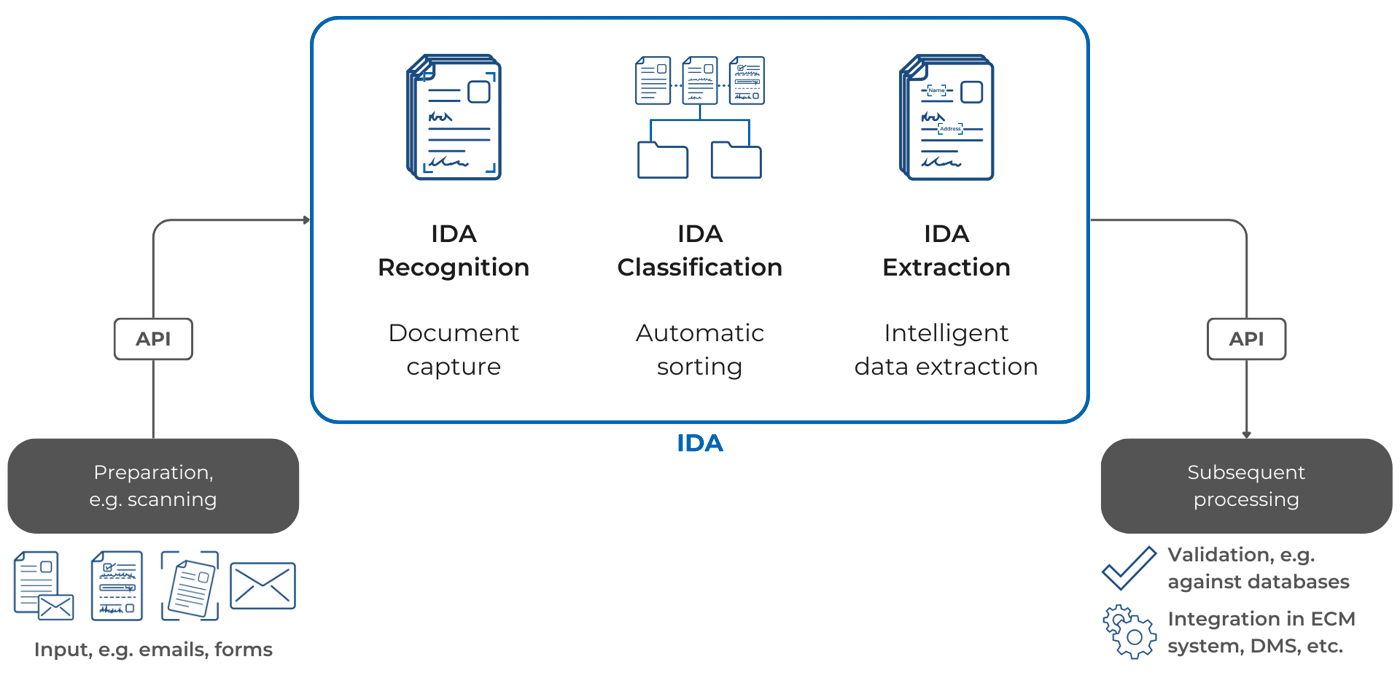
Intelligent document processing (IDP) closes this gap. IDA reads the document, recognises its type and extracts the data the next step needs. After that, the workflow continues automatically: the data is checked against existing databases and handed over to the ECM, the DMS or the specialist application.
Unlike fixed rules, IDA learns from examples. New document types or layouts do not need a new set of rules.
Seven hurdles and what helps
1. Many formats
Documents arrive as forms, invoices, letters, emails and attachments. What helps: software that handles all of them. IDA reads structured forms as well as free text and learns new document types from a few examples, right in the browser.
2. Poor originals
Faint scans, faxes and faded records lead to reading errors that run through the whole process. What helps: text recognition built for difficult originals. IDA reads machine print with an accuracy of more than 99 %.
3. Handwriting
Handwritten entries vary from person to person. Many systems stop here. What helps: handwriting recognition trained on real handwriting. IDA recognises handwriting with an accuracy of more than 95 %. More in our blog post on handwriting recognition.
4. Exactly the right data
Every workflow needs different values: the IBAN in one, the policy number in another. What helps: extraction you can set up for your use case. More in our blog post on entity extraction.
5. Growing volumes
More customers, more documents. What helps: software that scales with the volume. A scanning service provider processes one billion pages a year with IDA and automated more than 90 % of its classification from the start.
6. Existing systems
Nobody wants to replace their ECM or DMS for automation. What helps: open interfaces. IDA delivers the data as JSON via API and, if needed, a searchable PDF for the archive. More in our blog post on PDF and JSON.
7. Data protection
Documents often contain personal and confidential data. What helps: control over where the data is processed. IDA runs in your own data centre, in a sovereign cloud or hybrid. More on our security and certifications.
Frequently asked questions
What is IDP?
Intelligent document processing: software that reads documents, recognises their type and extracts the data. It turns documents into input a workflow can use.
What is the difference between workflow automation and RPA?
RPA (robotic process automation) repeats clicks and inputs in existing applications. It needs data that is already structured. IDP supplies that data from documents, so both work well together.
Do we have to replace our existing systems?
No. IDA connects via interfaces and hands over the data to the systems you already use.
Where do people stay involved?
Wherever a result is uncertain or a decision is needed. IDA gives every result a confidence score. Below the threshold you set, a person checks. More on this in our blog post on document automation.
See it with your documents
In a demo, we show you where documents slow down your workflows and which steps IDA can take over.