
More documents, fewer skilled people: many organisations face both at once. Positions stay vacant, and the files keep coming.
Document automation does not solve the skills shortage. It makes sure the people you have spend their time on decisions, not on sorting paper.
What is document automation?
Document automation means software takes over the repetitive steps around documents: reading, sorting, extracting data, checking for completeness, preparing a decision.
It happens in two stages. The first turns documents into data. The second works with the content. In both stages, people stay in charge of the decision.
Stage 1: capture, sort, extract
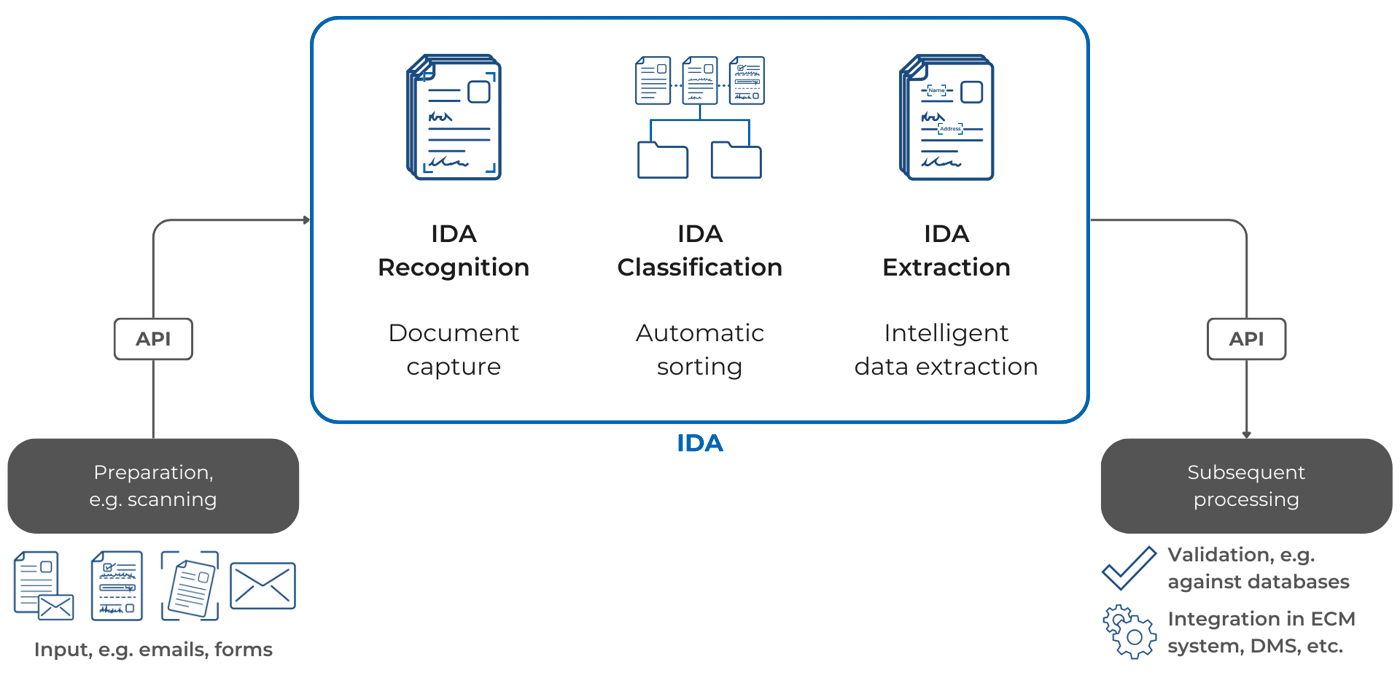
IDA reads incoming documents, recognises their type and pulls out the data the next step needs. Machine print with an accuracy of more than 99 %, handwriting with more than 95 %, historical scripts included.
How well this works in practice is shown by a scanning service provider that processes one billion pages a year: with IDA, it automated more than 90 % of its document classification from the start.
More on the individual steps in our blog posts on digital document capture, the digital inbox and PDF classification.
Stage 2: review and prepare
Once documents have become data, the actual work begins: reading a file, checking an application, evaluating a tender. This is where the JAIDE AI colleagues come in.
JAIDE Akte reviews an entire case file, checks it for completeness and contradictions and answers the key questions with the exact source. JAIDE Antrag checks incoming applications against agreed criteria and names missing evidence. JAIDE Ausschreibung reads tenders of 600 pages and more and pulls out the requirements that matter.
What stays with people
The decision. Software reads, sorts, checks and prepares. Whether an application is approved, a claim is paid or a bid is submitted is decided by a person.
That only works if the person can trace what the software has done. IDA marks uncertain results with a confidence score. JAIDE shows the source of every statement.
Where it pays off
Insurance
Incoming mail, claims and policy changes are read and routed. Clerks start with complete cases.
Public administration
Applications are checked for completeness before anyone works on them. Fewer follow-up requests, faster decisions.
Justice and law
Extensive files are reviewed and summarised with references, so judges and lawyers can focus on the legal assessment.
Healthcare
Patient records, findings and letters are classified and filed in the right record.
Scanning service providers
Digitisation projects deliver classified documents and data, not just images.
Frequently asked questions
What is the difference between document automation and IDP?
IDP (intelligent document processing) is the first stage: capturing, classifying and extracting. Document automation also covers the work that follows, such as reviewing and preparing decisions.
Does document automation replace employees?
No. It takes over repetitive steps. People keep the decisions and gain time for them.
Do we need a cloud for this?
No. IDA and JAIDE run in your own data centre, in a sovereign cloud or hybrid.
Where do we start?
With a process that involves many similar documents and a lot of manual effort, such as incoming mail or a specific type of application.
See it with your documents
In a demo, we show you which steps IDA and JAIDE can take over in your processes.