
A letter contains a name, an address, a date and an IBAN. A person sees that at a glance. For software, the letter is just text, until entity extraction tells it which part is which.
What is entity extraction?
Entity extraction finds specific pieces of information in a text and labels them. These pieces are called entities: names of people and organisations, places, dates, amounts, contract or customer numbers.
The result is structured data. Instead of a page of text, you get “name: John Doe”, “date: 2 February 2021”, “IBAN: DE10…”. Business software can work with that directly. More on this in our blog post on structured data.
Why it starts with text recognition
Entity extraction can only find what the text recognition has read correctly. If a digit in the IBAN is wrong, the extracted IBAN is wrong too.
That is why IDA starts with reliable recognition: machine print with an accuracy of more than 99 %, handwriting with more than 95 %. More in our blog post on handwriting recognition.
Forms and invoices: extraction from examples
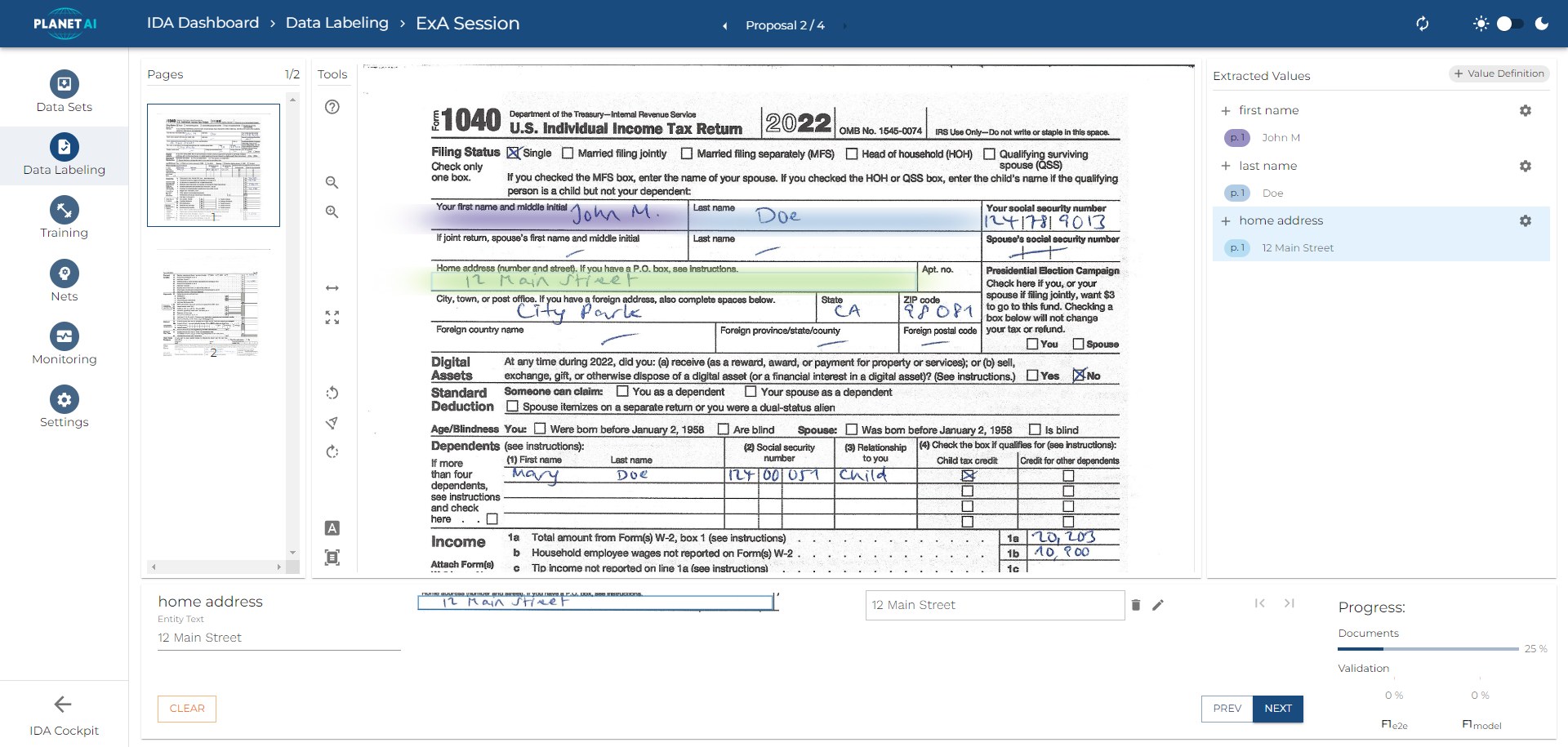
In forms and invoices, the same information is usually in the same place. IDA learns where from a few marked examples. You mark the field once, for example “home address”, and IDA reads it from every further document of that type.
No template has to be built by hand. Handwritten entries and ticked boxes are read as well.
Emails and letters: extraction from free text
In emails, letters and reports, information can be anywhere. Here too, IDA extracts the data your process needs, such as sender, date or IBAN, even from a handwritten letter. Deterministic: recognition, not guessing.
Forms and free text compared
| Forms and invoices | Emails and letters | |
|---|---|---|
| Typical documents | Forms, invoices, applications | Emails, letters, reports |
| Information is | Always in the same place | Anywhere in the text |
Where entity extraction is used
Invoices
Invoice number, date, amounts, tax and supplier go straight to accounting, without anyone typing them.
Contracts
Parties, start and end dates, terms and payment clauses become data. Deadlines and conditions can be monitored.
Customer onboarding
Banks and insurers take name, date of birth and address from ID documents and application forms into their systems.
Emails and incoming mail
Contact details, order numbers and requests are read from incoming messages. The message lands in the right process. More in our blog post on the digital inbox.
Frequently asked questions
What is the difference between entity extraction and named entity recognition?
Named entity recognition (NER) finds entities in a text and assigns a type, such as person or place. Entity extraction goes one step further and hands the values over as structured data, ready for the next system.
How many examples does IDA need?
For forms and invoices, a few marked examples per document type are enough.
What happens if a value is uncertain?
IDA gives every value a confidence score. Values below the threshold you set go to a person for checking.
Does entity extraction work with handwriting?
Yes. IDA reads handwriting with an accuracy of more than 95 %, so handwritten forms and letters can be extracted as well.
See it with your documents
In a demo, we show you how IDA finds the information your process needs in your documents.