
A scanned PDF looks like a document, but for a computer it is a picture. You cannot search it, copy from it or process it. Text recognition turns the picture back into text.
What is PDF text recognition?
PDF text recognition reads the text in a scanned or photographed document and stores it as machine-readable text. The page looks the same as before, but you can now search it, copy from it and pass it on to other systems.
It is the first step in any automated document process. Sorting, extraction and checking all depend on it: what is read wrongly at the start stays wrong in every later step.
OCR, ICR and HTR
| Term | Stands for | Reads |
|---|---|---|
| OCR | Optical character recognition | Machine print |
| ICR | Intelligent character recognition | Handwritten block letters and digits, for example in form fields |
| HTR | Handwritten text recognition | Continuous handwriting, including historical scripts |
In practice, the three are rarely separated: a form contains printed labels, handwritten entries and ticked boxes on the same page. IDA reads all of them in one pass.
What good text recognition has to handle
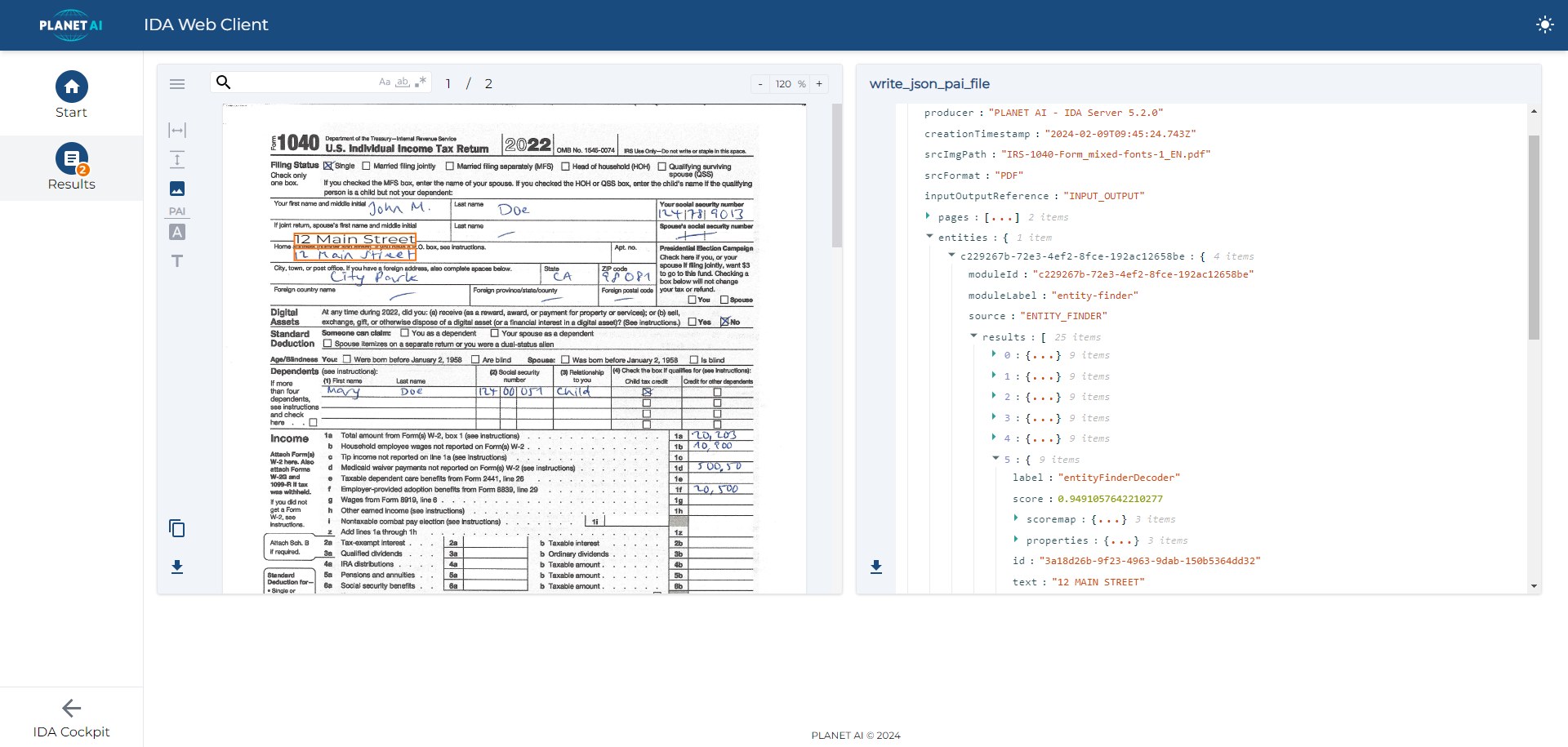
Poor originals
Faint scans, faxes, stamps over the text, skewed photos. IDA reads machine print with an accuracy of more than 99 %, even from difficult originals.
Handwriting
Handwritten entries vary from person to person. IDA recognises handwriting with an accuracy of more than 95 %, historical scripts such as Kurrent included. More in our blog post on handwriting recognition.
Layout and reading order
Columns, footnotes, headers and text boxes have to be read in the right order. Otherwise sentences end up in the wrong place.
Tables
Rows and columns have to stay rows and columns, so that each amount stays next to the right item.
What you get at the end
- A searchable PDF: the original page with an invisible text layer. People can search it, copy from it and file it in the DMS.
- Text and data as JSON: for systems that process the content further. More in our blog post on PDF and JSON.
Once the text has been recognised, the next steps can follow automatically: classification sorts the document, data extraction reads out the values.
Where PDF text recognition is used
Incoming mail
Letters, forms and email attachments become text that can be sorted and routed. More in our blog post on the digital inbox.
Archives and heritage
Records, church books and files become full-text searchable, even if they are handwritten. More about IDA for archives.
Scanning service providers
Digitisation projects deliver searchable documents, not just images.
Public administration
Applications and evidence submitted on paper or as scans become usable for digital processes.
Frequently asked questions
What is the difference between a scanned and a searchable PDF?
A scanned PDF contains only an image of the page. A searchable PDF also has an invisible text layer, so you can search and copy the text.
Does text recognition work with handwriting?
Yes. IDA recognises handwriting with an accuracy of more than 95 %, both in form fields and in continuous text.
Which formats can IDA read?
PDF and image formats such as PNG and JPG, from scanners, email attachments or uploads.
Does the data leave our company?
Not if you do not want it to. IDA runs in your own data centre, in a sovereign cloud or hybrid.
See it with your documents
In a demo, we show you how IDA reads your scanned PDFs, even difficult originals and handwriting.