
Every morning the same thing: letters, emails with attachments, faxes, web forms. Someone opens, reads, sorts and passes everything on before the actual work can start. That takes up working time every single day.
A digital inbox does this sorting automatically.
What is a digital inbox?
A digital inbox collects all incoming documents in one place, reads them and routes each one to the right department or case. Paper is scanned first, digital documents are read directly.
The terms digital mailroom and input management mean the same thing.
How it works
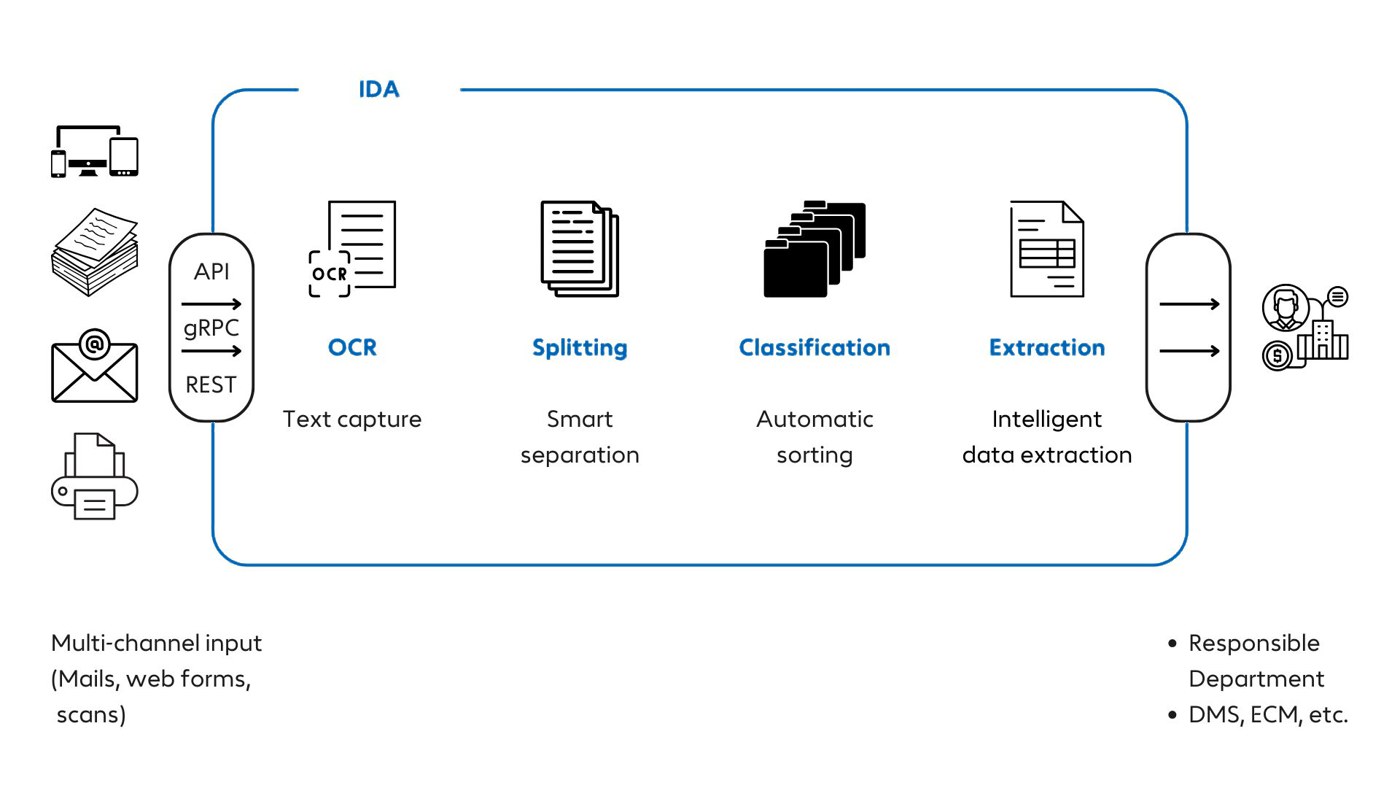
- Documents arrive via email, scan, fax, web form or an interface (API, gRPC, REST).
- Text recognition reads printed text, handwriting, checkboxes and barcodes.
- If one PDF contains several documents, the software splits it into individual documents.
- Classification decides what each document is: invoice, contract, order, termination notice.
- Extraction pulls out the data the next step needs, such as amount, customer name or contract number.
- The result goes to the responsible department, or to DMS, ECM or a specialist application.
Wherever the software is unsure, a person checks the document. Everything else runs through.
What changes for the team
Nobody has to open, sort and distribute mail any more. The team starts with documents that are already in the right place, with the key data filled in.
Every step is logged. Who received what, when, and where it went can be traced at any time, which helps with audits and compliance.
What to look out for
- How well the software reads difficult originals, handwriting and forms with checkboxes.
- Whether it splits mixed PDFs reliably before classifying them.
- Whether new document types can be added without programming.
- Which systems it hands over to, and through which interfaces.
- Where it runs. For personal data, your own data centre or a sovereign cloud may be required.
IDA for input management covers all of these steps. The details are in our blog posts on digital document capture and PDF classification.
Frequently asked questions
What is the difference between a digital inbox and input management?
None in substance. Both describe the automatic capture, sorting and routing of incoming documents. Input management is the more common term in insurance and banking.
Does the digital inbox also handle email attachments?
Yes. Emails and their attachments are read just like scanned letters.
How does the software know which department is responsible?
From the document type and the extracted data, for example a contract number or a case reference. You define the routing rules.
What happens with documents the software cannot assign?
They go to a person for review. Every assignment has a confidence score, and you set the threshold.
Do we have to replace our existing systems?
No. A digital inbox sits in front of them and delivers the data via interfaces.
See it with your mail
In a demo, we show you how IDA reads, sorts and routes documents like yours.