
Invoices, applications, medical reports, notices of termination: every incoming document has to end up in the right place. Sorting them by hand ties up people who are needed elsewhere. PDF classification takes over this step.
What is PDF classification?
PDF classification assigns each incoming document to a class automatically. You define the classes yourself, whether ten or several hundred. The software reads the content and the layout of the document and assigns it to a class.
It works the same way for scans and photos (PNG, JPEG) as for PDFs.
Where classification fits in
First, text recognition reads the document. Then classification decides what kind of document it is. After that, extraction pulls out the data you need, such as an invoice number or a date. The results go to your ECM or document management system.
Classification is the switch in the middle. If it sorts wrongly, every step after it works with the wrong document.
Three ways to classify
| Approach | Strength | Weakness |
|---|---|---|
| By hand | People handle the unexpected | Slow and tiring with large volumes |
| With rules | Fast and consistent for known documents | Every new document type needs new rules |
| With AI | Learns from examples, adapts to new types | Needs an initial training phase |
Rule-based systems often break when a layout changes. AI models learn what a document class looks like and recognise it even in a new design.
What it changes in practice
A scanning service provider processes one billion pages a year for healthcare, the public sector and businesses. With a rule-based IDP product, it automated less than 50 % of its document classification. Everything below the confidence threshold had to be checked by hand.
With IDA, the automation rate reached more than 90 % from the start. Setup took less than three days. The previous solution had needed 240.
When new regulations came in, the number of document classes grew from around 150 to more than 300. IDA learned the new classes from a few examples. Manual effort fell by 80 %, while false positives stayed below 1 %.
Where PDF classification is used
Finance and accounting
Invoices, receipts and bank statements are recognised and routed to bookkeeping.
Healthcare
Patient records, findings and prescriptions are separated and filed in the right record.
Public administration
Incoming letters, applications and notices reach the responsible department.
Email inboxes
PDF attachments such as invoices or tickets are recognised and sorted as soon as they arrive.
Common pitfalls
Some document classes look almost identical. A cancellation and a change of contract sometimes share the same form. Here, the layout alone is not enough. IDA also reads the content.
Scans vary in quality. Faded copies, skewed pages and stamps make recognition harder. Classification can only be as good as the text recognition underneath it.
Layouts change. When an insurer redesigns its forms, rule sets need rework. A trained model recognises the new version from a few examples.
IDA Classification
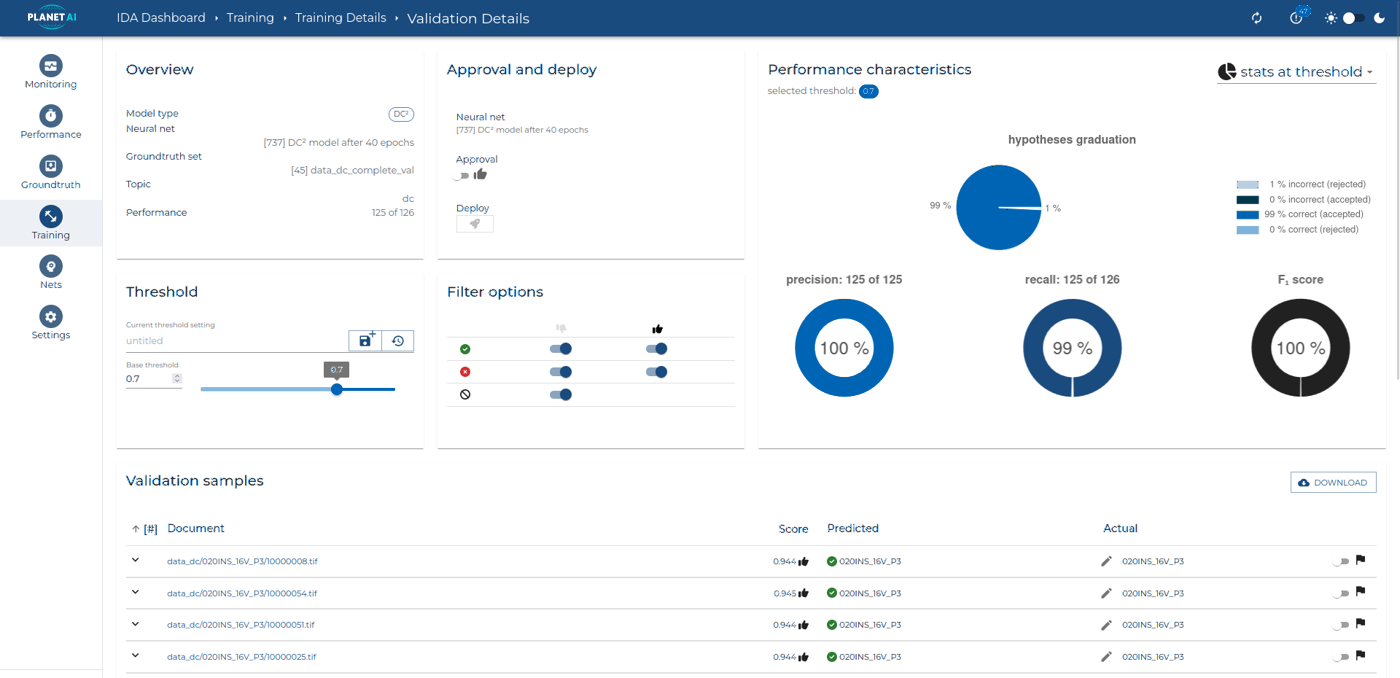
IDA Classification learns from examples, not from fixed rules. You can add new classes at any time. Every assignment comes with a confidence score. You set the threshold above which a document goes through automatically.
Large PDFs often contain many documents in a row. Document Splitting recognises where one document ends and the next begins and splits the file.
Frequently asked questions
What is the difference between classification and extraction?
Classification answers the question “What kind of document is this?”. Extraction answers “Which data does it contain?”. Classification comes first, because the class determines which data is extracted.
How many document classes are possible?
You define the classes yourself. In the project with the scanning service provider, there are more than 300.
Does it work with scanned documents?
Yes. IDA classifies scans and photos as well as digital PDFs.
What happens when the software is unsure?
Every assignment has a confidence score. Below the threshold you set, a person checks the document.
How do I split a PDF that contains several documents?
With Document Splitting. IDA recognises the start and end of each document and splits the file accordingly.
See it with your documents
In a demo, we show you how IDA sorts documents like yours.